Image from question 1
The original images are located here.
The code used in this assignment can be viewed here.
/* Question 1 */
/* (a+b)/2 */
out_pixel[i]=(unsigned char)((PARAM_A*a_pixel[i]+PARAM_B*b_pixel[i])
/(PARAM_A+PARAM_B));
with PARAM_A = PARAM_B = 1.
The resultant image resembled the building at dusk. However, this image appears "washed out" or "duller" compared to the image from question 2. It exhibits less of a range of pixel values.
Image from question 1

Image from question 2
/* Question 2: lightspace imaging */
double q1, q2, qw;
q1 = myfinv( (double)a_pixel[i] );
q2 = myfinv( (double)b_pixel[i] );
qw = (PARAM_A*q1+PARAM_B*q2)/(PARAM_A+PARAM_B) ;
out_pixel[i]=(unsigned char) myf(qw) ;
double myf( double x )
{
return pow(x, 1.0/4.7) ;
}
double myfinv( double x )
{
return pow(x, 4.7 );
}
When the two images were added using this method, with PARAM_A=PARAM_B = 1 (as in question 1), the image has more vibrant, contrasting colours and shades. See above image.
Varying the weights of the two gives interesting results. Comparing two images, with day = imageA, and night = imageB
the first created using:
PARAM_A = 16
PARAM_B = 1
and the second created using
PARAM_A = 8
PARAM_B = 1
we see that the brightness of the lights appears to be varying.
It appears as though it is evening. In the first image, the lights
appear dimmer, and then somewhat brighter in the latter. The rest
of the background remains the same. It is as though someone was playing
with a dimmer switch on the lights. This is presumably because with
the day photo weighted 16 times as much, the contrast between the lights
and the background is less. However, this contrast plays a greater
role when the daytime photo is weighted less with respect to the nighttime
photo.

image with day weighted 16x the nighttime photo

image with day weighted 8x the night photo
Comparing two images,
the first created using:
PARAM_A = 1
PARAM_B = 16
and the second created using:
PARAM_A = 1
PARAM_B = 8
the variation is the opposite of above. The first appears as
though it is later in the evening, with the background less lit than in
the second, where the background is more lit. The intensity of the
well lighted parts doesn't change, and the dimmer parts show more change
between images. This is presumably because with the night photo weighted
greater, the background lights have less influence in the second image
than in the first.

image with night weighted 16x as much as day

image with night weighted 8x as much as day
/* set the colour weights assuming 24 bit pixels (8 bits per R,G,B)
*/
if( i==0 ) { cw1 = R1; cw2 = R2 ; }
else if( i==1 ) { cw1 = G1 ; cw2 = G2 ; }
else if( i==2 ) { cw1 = B1 ; cw2 = B2 ; }
q1 = myfinv( cw1*(double)a_pixel[i] );
q2 = myfinv( cw2*(double)b_pixel[i] );
With the values
#define R1 0.0
#define G1 0.3
#define B1 1.0
#define R2 1.0
#define G2 1.0
#define B2 0.5
The image obtained was:
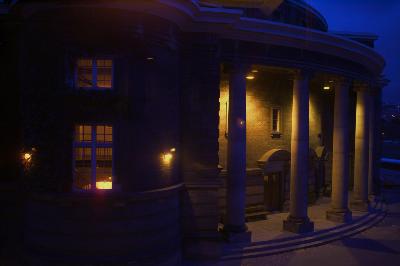
The blue sky and buidling highlights appears because of the large blue
contribution from the day photo. These areas approached a white value
in the day photo and so the blue in them was highlighted more. The
lights appear more yellowish. This is because of the weights of the
red and green compared with the lesser weight of the blue in the second
image.
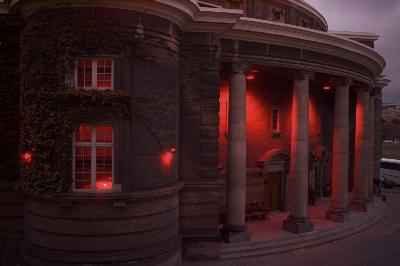
Changing to:
#define R1 1.0
#define G1 1.0
#define B1 1.0
#define R2 1.0
#define G2 0.3
#define B2 0.3
brings out the red in the lights, creating the image I like to
call "Red Alert at Con Hall"